Sadan: money ledger for builder firms
Know your cash, your cheques, and each project’s profit, right on your phone.
Built for firms that sell flats, raise investor money, and do joint-venture land deals. Made for the phone first, with a read-only login for your CA.
Free, no obligation. Replies within 24 hours.
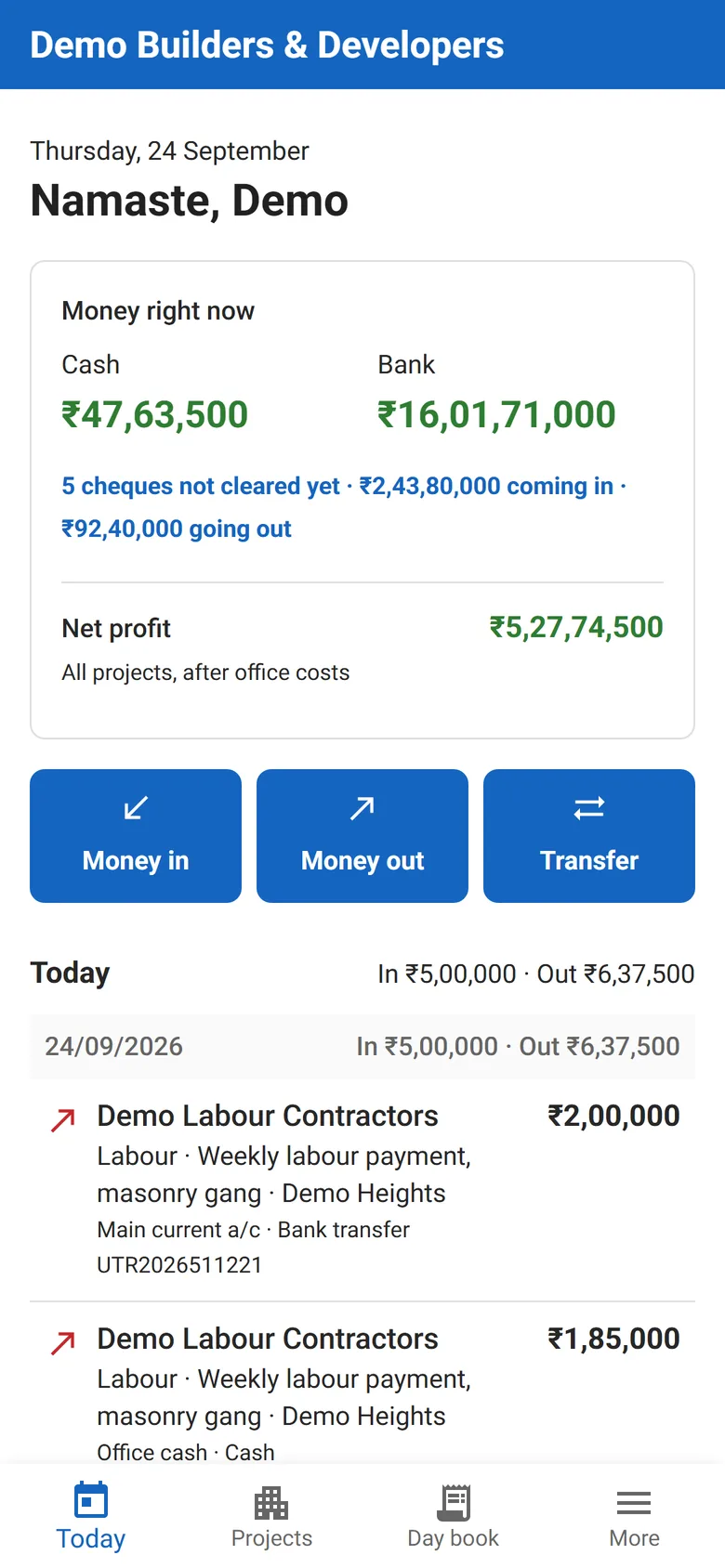
Today. Cash, bank, cheques still to clear, and net profit, the moment you open it.
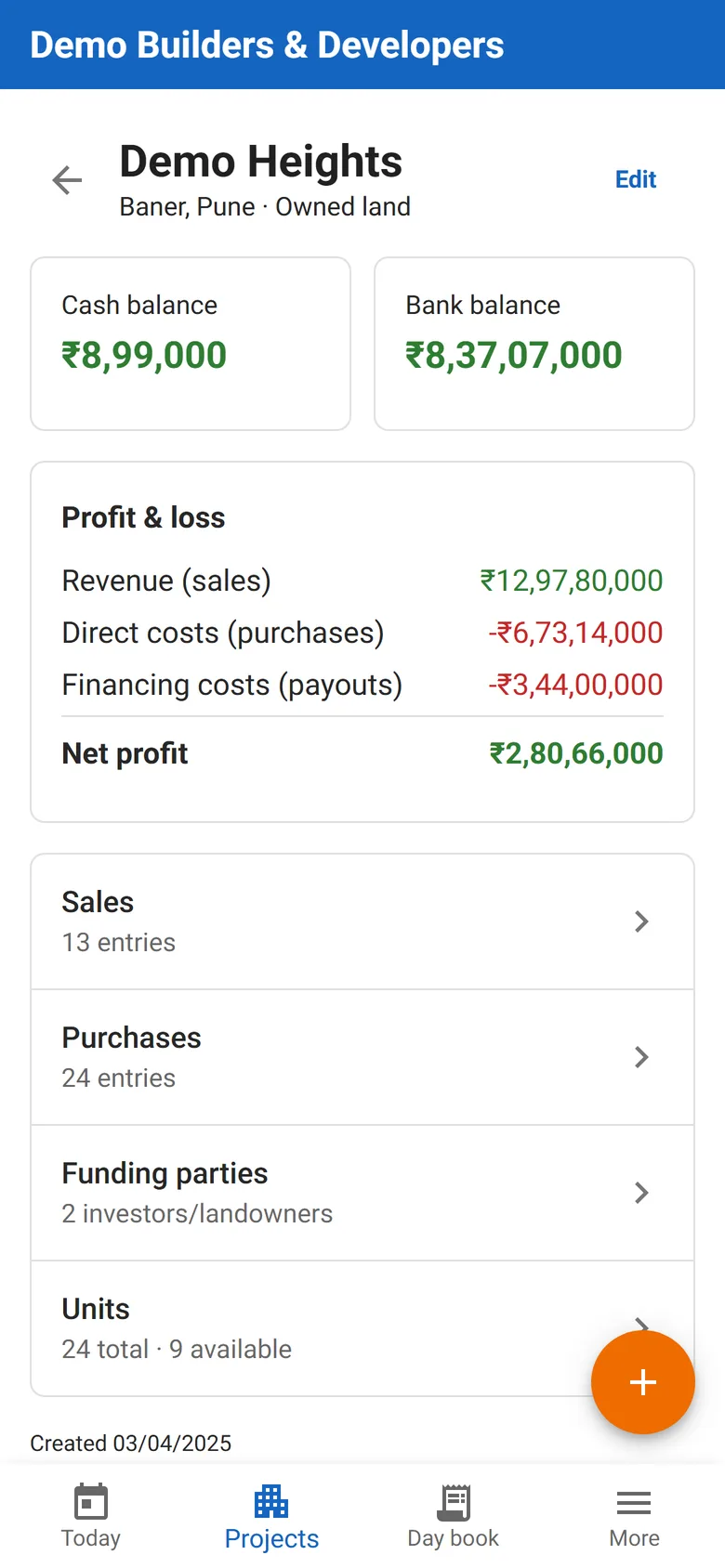
Project P&L. Each project’s profit, live.
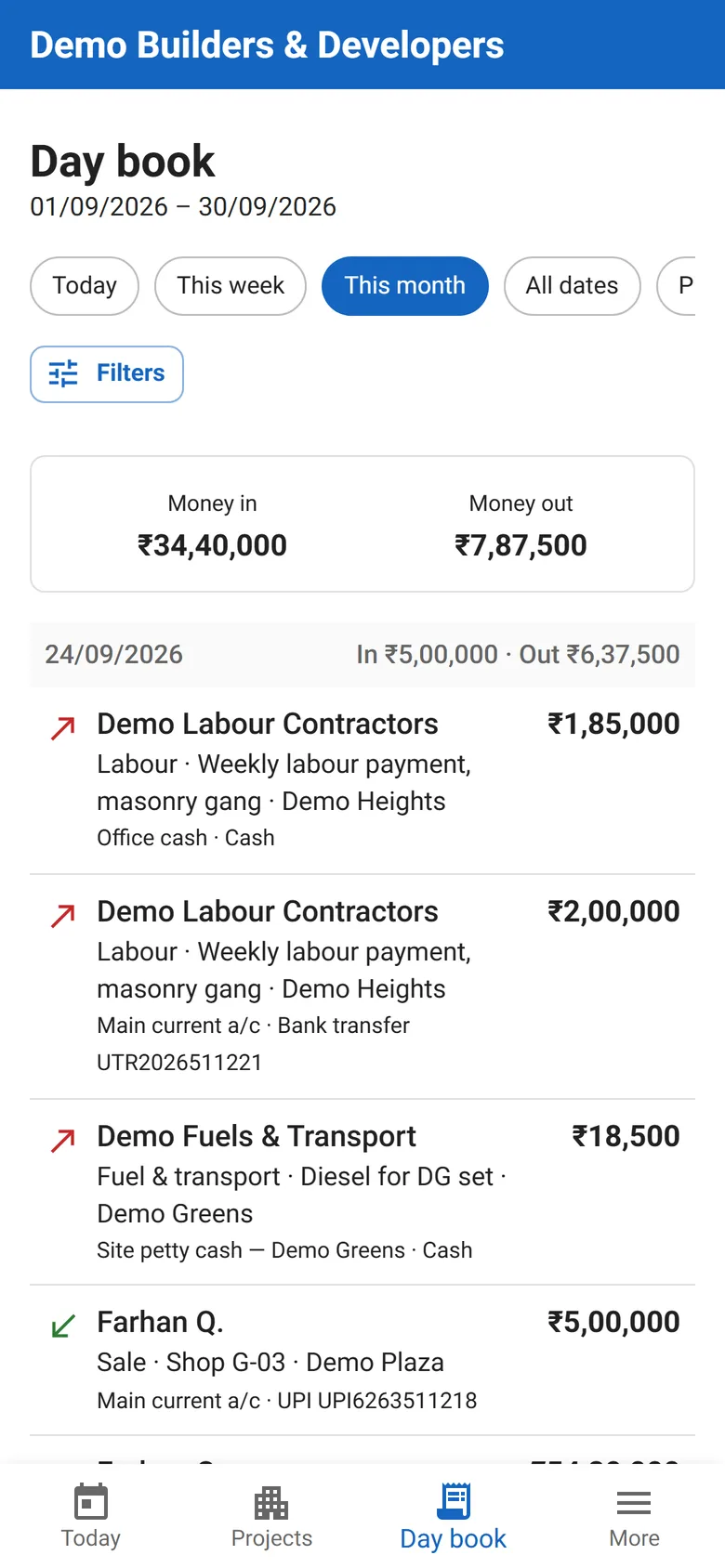
Day book. Every rupee in and out, day by day.
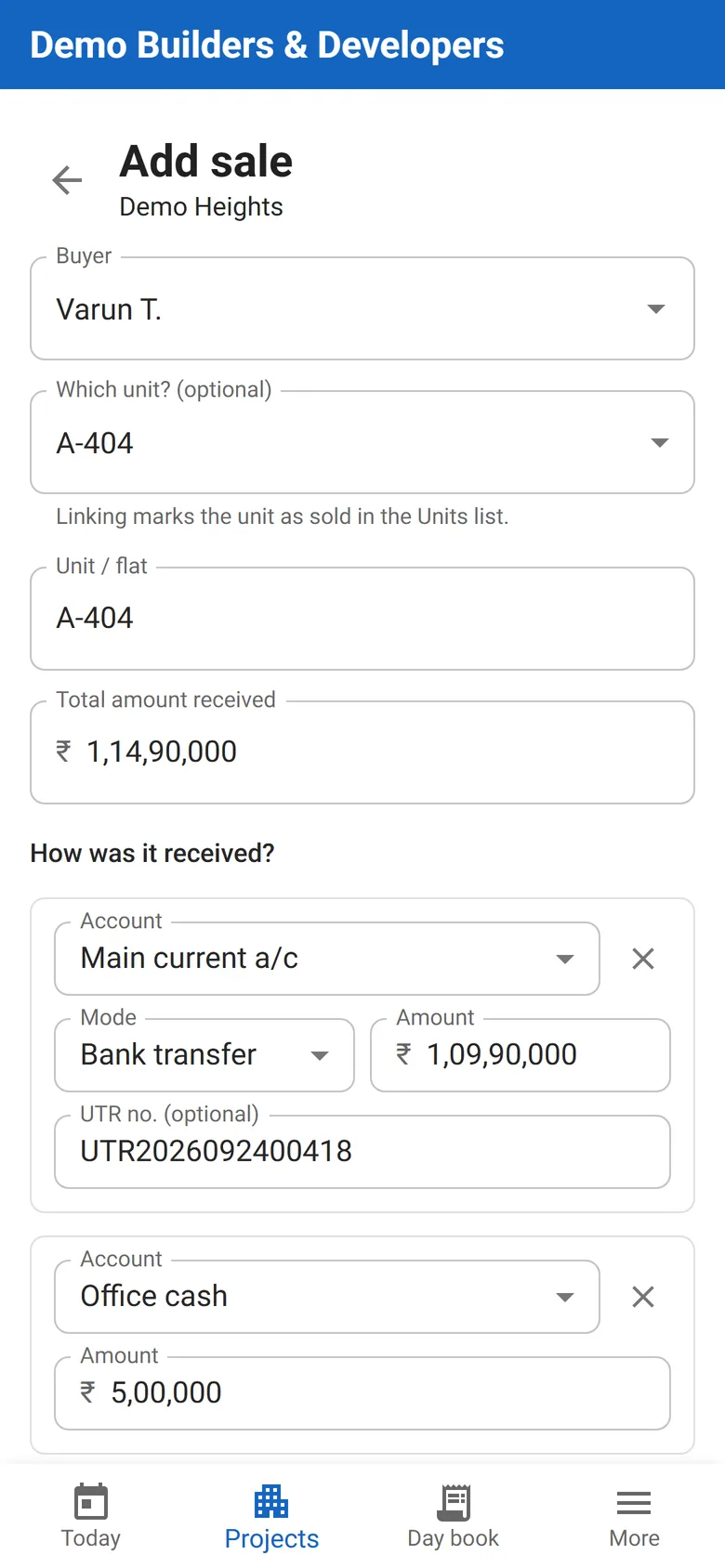
Add a sale. One sale, paid across bank and cash.
Shown with demo data · swipe for more
Sound familiar?
Your week today, and with Sadan.
If two of these sound like your week, a demo is worth your time.
Request a Sadan demo →- 01
Project costs, purchases, and investor commitments are tracked across disconnected spreadsheets.
With Sadan
Sales, purchases, investor money, and landowner deals for every project, in one ledger.
- 02
There’s no single view of what’s been sold, what’s been bought, and what’s owed to whom.
With Sadan
Every flat shows as available, allocated, or sold, and every party’s page shows what they’ve paid and been paid, across projects.
- 03
Cheques sit uncleared, and nobody notices until one bounces.
With Sadan
Each cheque stays pending until it’s marked cleared or bounced, and a bounce is flagged on the home screen.
- 04
Investor reporting is assembled by hand before every update.
With Sadan
Each investor’s page already shows what they put in, what’s been paid back, what’s still owed, and the agreed terms.
How it runs
One flow, start to finish.
Project & units set up
Sales and purchases logged
Payments split and cleared
Investors and landowners tracked
Project P&L
Project & units set up
Sales and purchases logged
Payments split and cleared
Investors and landowners tracked
Project P&L
A look inside
Sadan, screen by screen.
Each screen answers a question you ask today by phone or on WhatsApp.
01Project P&L
Is this project making money?
Each project’s revenue, purchases, and financing costs roll up to a live net profit, with a statement PDF and CSV export.
sadan · project p&l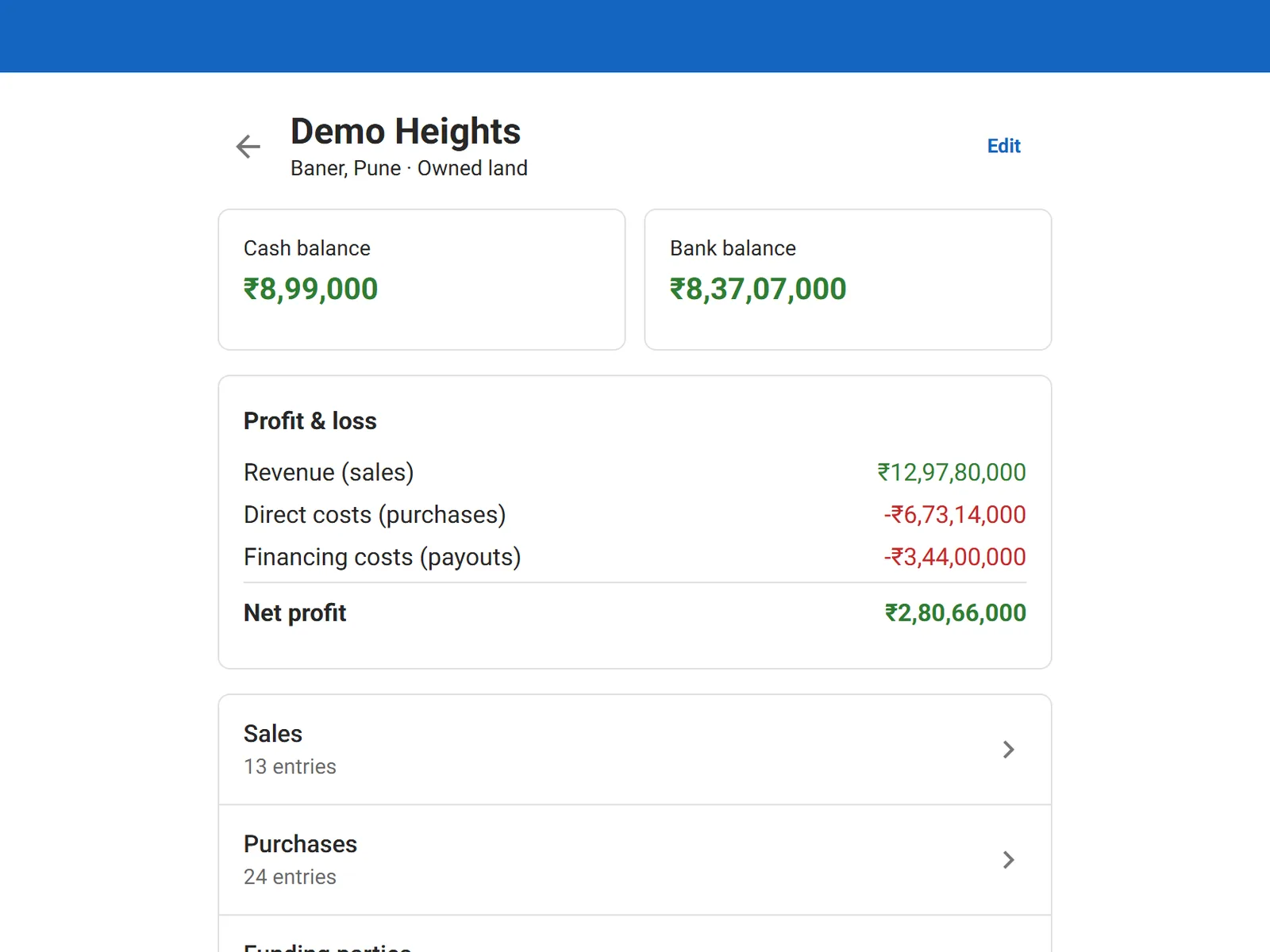
Demo data · tap for the full screen
02Day book
What came in and went out, and how?
Every rupee in and out, day by day, with the account, the mode, and the UTR or cheque number. Uncleared cheques are flagged.
sadan · day book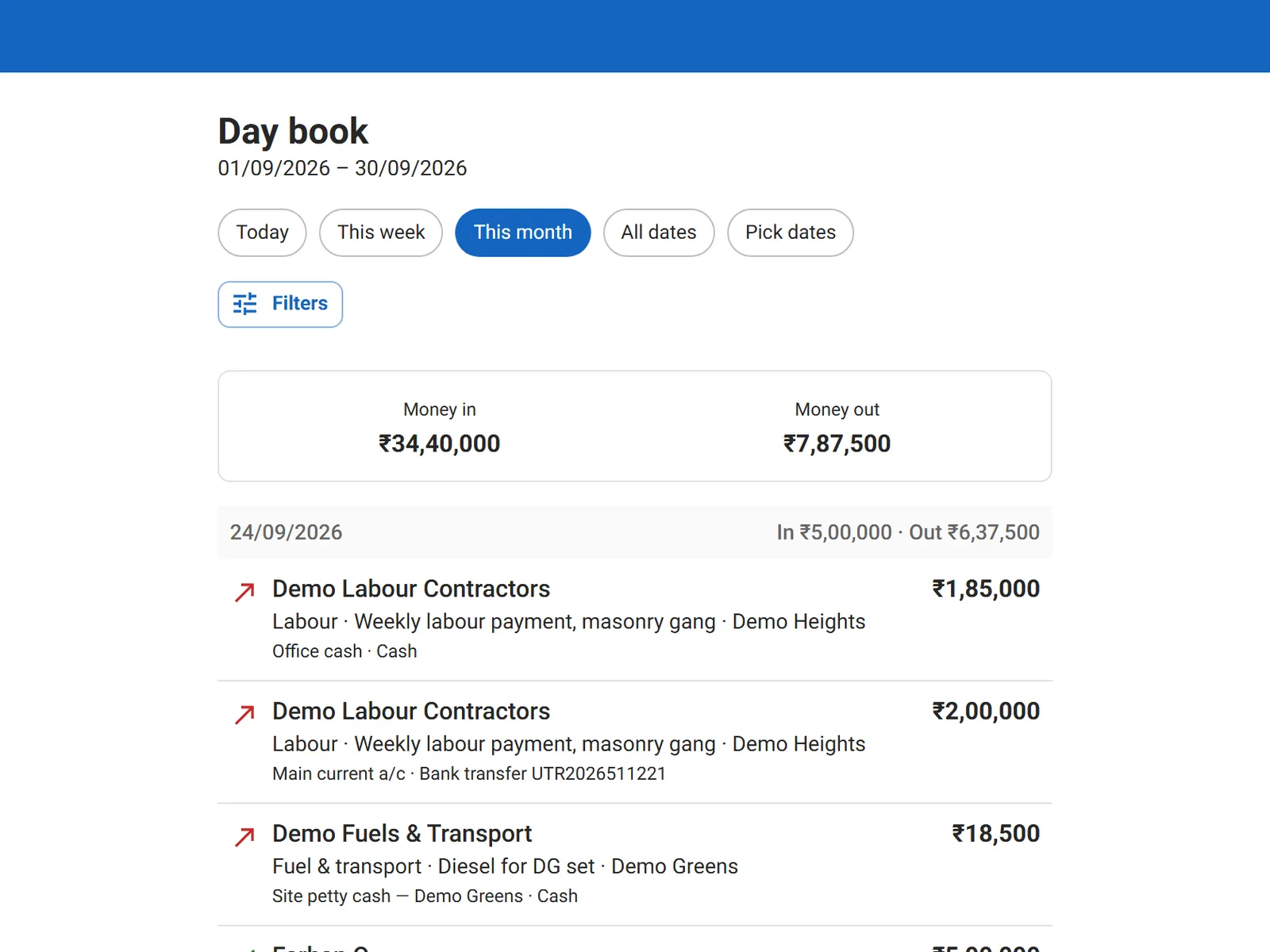
Demo data · tap for the full screen
03Investor returns
What do we still owe this investor?
What each investor put in, what has been paid back, what is still owed, and the terms that were agreed, in writing.
sadan · investor returns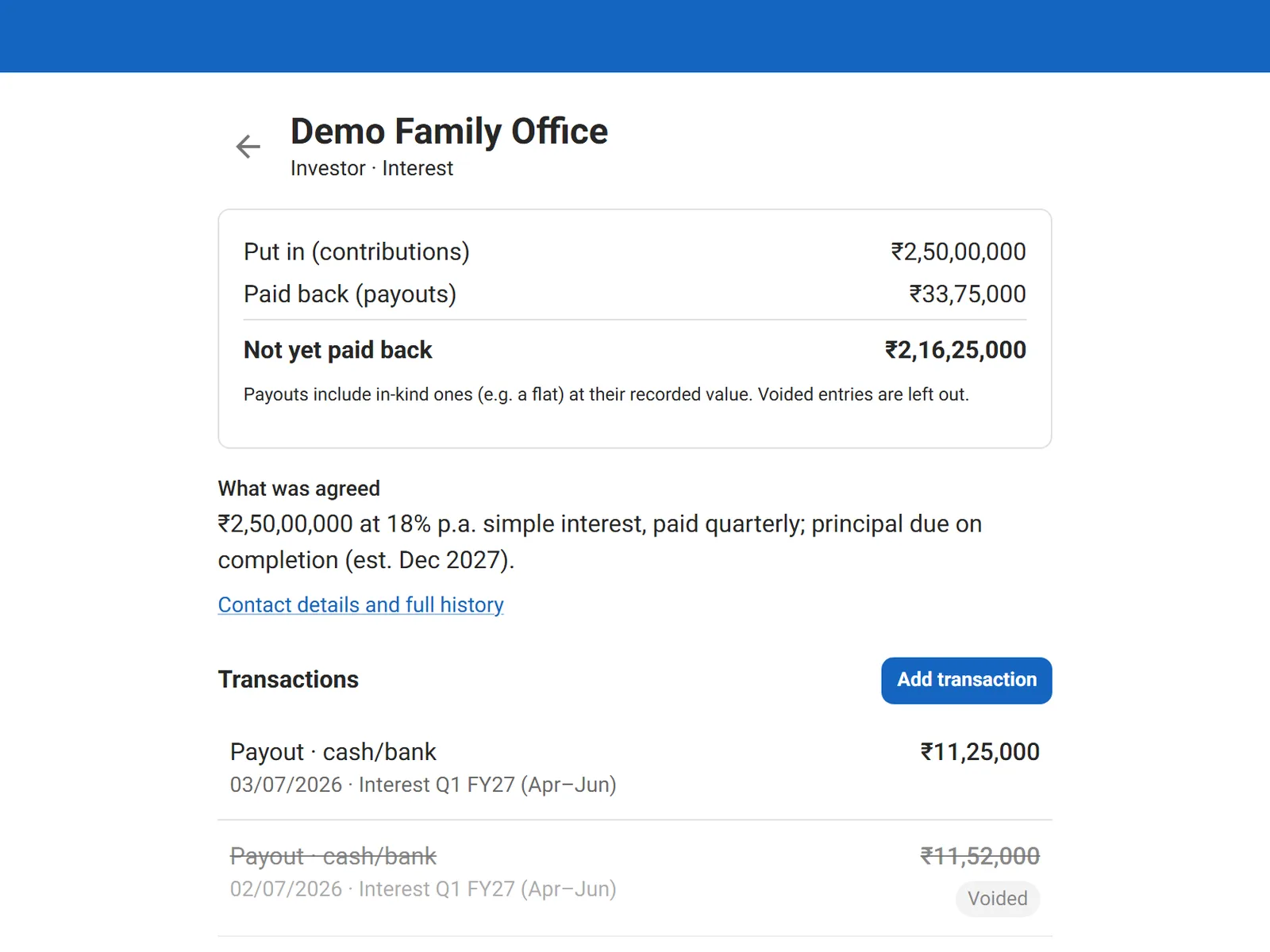
Demo data · tap for the full screen
04JV landowners
What has the landowner received so far?
Joint-venture land recorded as an in-kind contribution, and flats or villas handed over as payouts at their recorded value.
sadan · jv landowners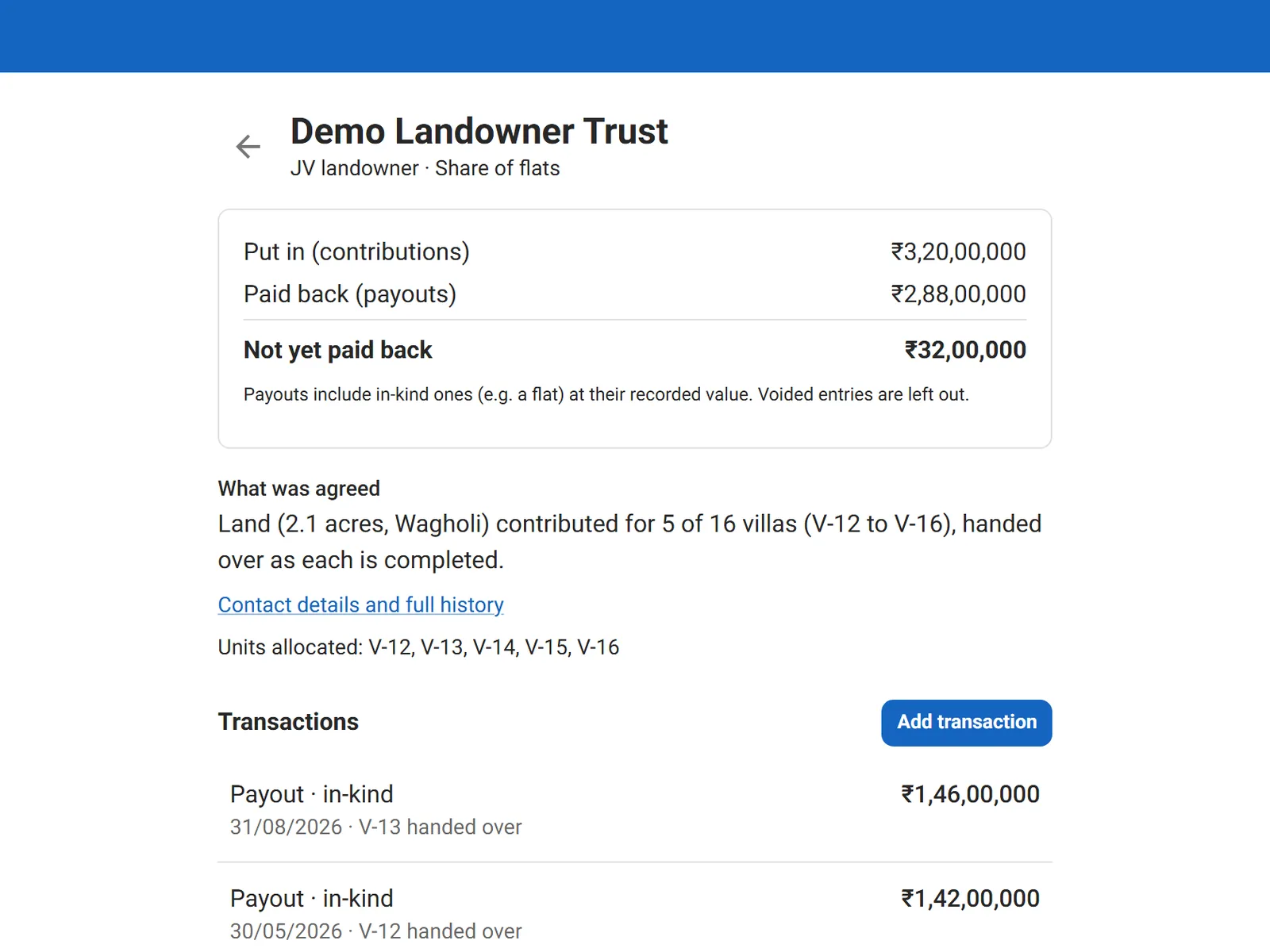
Demo data · tap for the full screen
05Void with a reason
Who changed this entry, and why?
Nothing is silently edited. A wrong entry is voided with a reason, and everyone can see who did it and when.
sadan · void with a reason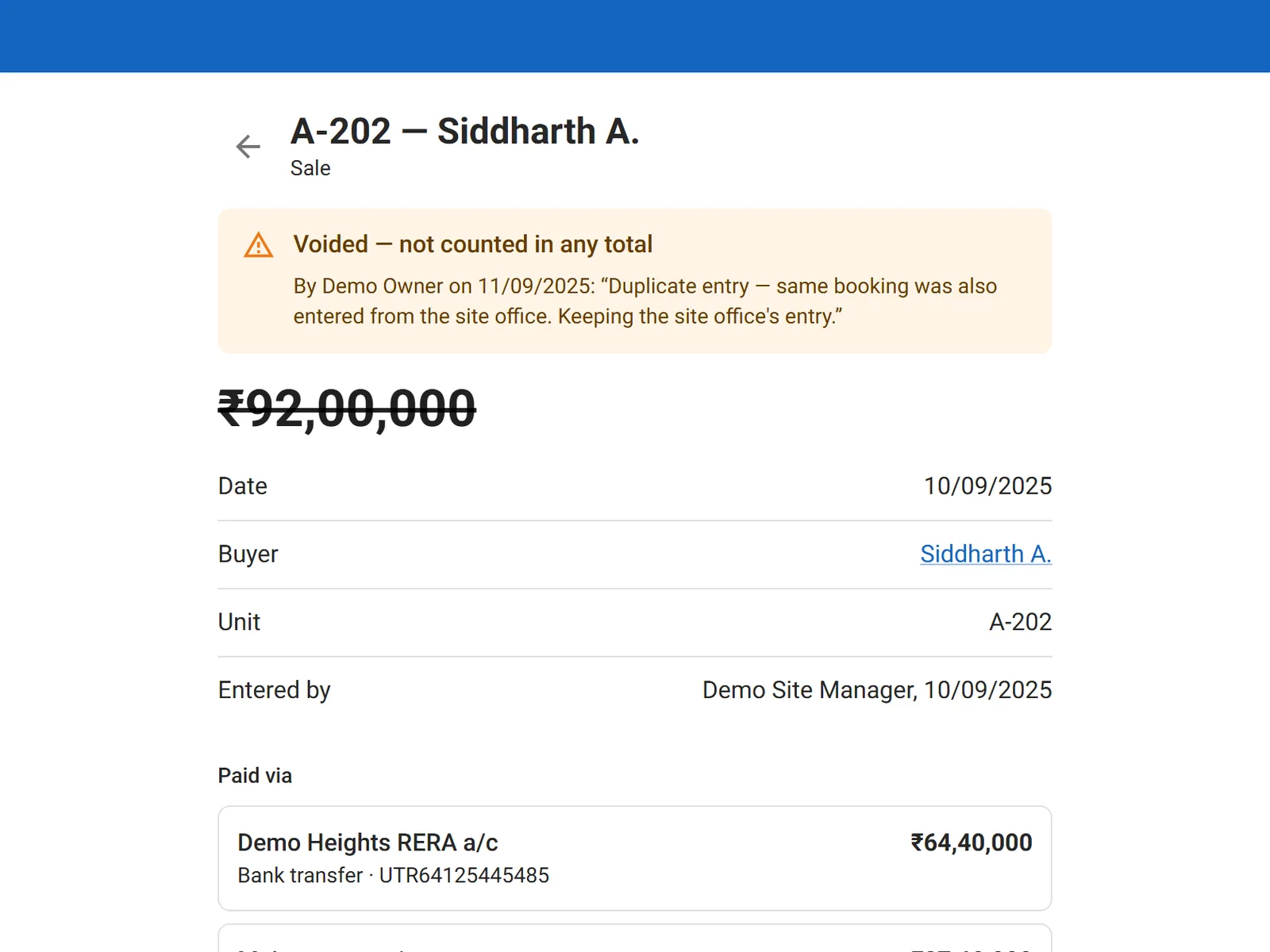
Demo data · tap for the full screen
The details
The small rules that make the numbers trustworthy.
01
Split payments that must add up
One sale can be paid in up to six parts across cash, UPI, bank transfer, cheque, and DD. The parts must match the total to the paisa, and cash can only land in a cash box.
02
Balances count only real money
Voided entries never count, and a cheque counts only once it has cleared. Until then it shows separately, as money in transit.
03
Flats handed over, valued from real sales
When a landowner or investor is paid in flats, Sadan suggests a value from the actual per sq ft rate of units already sold, falling back to average price and then your baseline. You can always adjust it.
04
Capital isn’t profit
Investor contributions stay out of P&L, and every payout, in cash or in kind, is counted as a financing cost. Project profit stays honest.
05
A bounced cheque has a way back
After a bounce, a replacement payment can be added to the same sale, capped at exactly what’s still unpaid.
06
A flat can’t be sold twice
A unit that is sold, or allocated to an investor or landowner, is locked. A second sale is refused.
See these rules at work in a demo.
Features
Everything it does, module by module.
Grouped the way your team splits the work, so each person can find their part.
Projects & units · 4
- Owned or joint-venture land, with baseline prices per unit and per sq ft
- Unit inventory: available, allocated, or sold
- Allocate several flats to an investor or landowner in one go
- A flat can’t be sold twice, or sold while it’s allocated
Sales & purchases · 4
- Sales with buyer, unit, amount, and split payments
- Purchases with supplier, expense category, and description
- Office expenses outside any project, counted against firm profit
- A bill or receipt photo or PDF on every entry
Accounts & cheques · 4
- Bank accounts (only the last four digits stored), a RERA-tagged project account, office cash, and site petty cash with its holder
- Account statements with balance brought forward and a running balance
- Transfers between your own accounts, kept out of P&L
- Cheques stay pending until marked cleared or bounced; bounces are flagged on the home screen
Day book · 3
- Every rupee in and out, newest first, with money-in and money-out totals
- Today, this week, this month, or any dates
- Filter by account, project, party, payment mode, or uncleared cheques
Investors & landowners · 4
- Fixed, interest, or share returns, with the agreed terms on record
- Contributions and payouts in cash or in kind, such as land or a flat
- What each party put in, what’s been paid back, and what’s still owed
- Units allocated to each party, visible on their page
Parties & reports · 4
- One directory for buyers, suppliers, contractors, investors, and landowners
- Each party’s history across every project, with totals received and paid
- Project P&L with a printable statement PDF
- Charts of net profit by project, and cash against bank
01
Projects & units
- Owned or joint-venture land, with baseline prices per unit and per sq ft
- Unit inventory: available, allocated, or sold
- Allocate several flats to an investor or landowner in one go
- A flat can’t be sold twice, or sold while it’s allocated
02
Sales & purchases
- Sales with buyer, unit, amount, and split payments
- Purchases with supplier, expense category, and description
- Office expenses outside any project, counted against firm profit
- A bill or receipt photo or PDF on every entry
03
Accounts & cheques
- Bank accounts (only the last four digits stored), a RERA-tagged project account, office cash, and site petty cash with its holder
- Account statements with balance brought forward and a running balance
- Transfers between your own accounts, kept out of P&L
- Cheques stay pending until marked cleared or bounced; bounces are flagged on the home screen
04
Day book
- Every rupee in and out, newest first, with money-in and money-out totals
- Today, this week, this month, or any dates
- Filter by account, project, party, payment mode, or uncleared cheques
05
Investors & landowners
- Fixed, interest, or share returns, with the agreed terms on record
- Contributions and payouts in cash or in kind, such as land or a flat
- What each party put in, what’s been paid back, and what’s still owed
- Units allocated to each party, visible on their page
06
Parties & reports
- One directory for buyers, suppliers, contractors, investors, and landowners
- Each party’s history across every project, with totals received and paid
- Project P&L with a printable statement PDF
- Charts of net profit by project, and cash against bank
Specification
What’s built in, today.
Every line on this sheet is running in the product now. Nothing here is a roadmap item.
Who logs in
- Owner
- Everything, including accounts, firm settings, expense categories, and user access.
- Staff
- Records and voids entries, transfers, projects, units, and parties; clears cheques; exports.
- Accountant
- Read-only across the books, including the activity log and exports. Every change is blocked on the server.
Built in
- Roles are enforced on the server, not just hidden on screen, so a missing button is never the only lock.
- An append-only activity log written with every change. Entries are voided, never deleted, with who and when on record.
- Mobile-first and installable on the phone’s home screen, with a bottom tab bar made for one hand.
- Project P&L, a statement PDF, and firm-wide or per-project CSV that opens cleanly in Excel.
- Exact decimal money to the paisa, lakh and crore formatting, and GSTIN and PAN checks on parties.
- Your own instance and database, one per builder firm. Your projects and your investors’ numbers stay yours.
Questions
Before you ask for a demo.
Can our CA see the books without changing anything?
Yes. The accountant role reads everything, including the activity log and the exports, and every change is refused on the server, not just hidden.
Does it handle joint-venture land deals?
Yes. Record the land as an in-kind contribution, allocate the landowner’s share of flats, and log each handover as a payout at its recorded value.
How does it treat the RERA account?
Tag a project’s bank account as its RERA account, and its collections, payments, and balance stay visible on their own, separate from your other accounts.
Does it work on a phone?
It was designed for the phone first. Install it to the home screen and it opens like an app, with Today, Projects, and the day book one tap away.
Where does our data live?
In your own instance and your own database. Nothing is shared with another customer, and your data stays yours.
Can it be changed to fit how we work?
Yes. We build and run these products ourselves, so changes for your workflow can be scoped and priced like any other build.
See how we approach custom builds.How is it priced?
We quote in writing after a short demo, once we know your users, locations, and how you work today. The demo costs nothing, and there’s no obligation.
Not quite your business?
- A signage, print, or fabrication businessSaral
- A vehicle-hire, staff-transport, or goods fleetSarathi
Build
Or get software built around how you work.
We build custom software and workflows the same way we built Sadan. Orders, approvals, dispatch, billing, and reports move off WhatsApp and Excel into one system your team uses, scoped and priced in writing, and yours to keep.
Next step
What happens after you ask.
No obligation at any step. Ask with the form, by email, or on WhatsApp, and we reply within 24 hours.
Request a Sadan demo →- 01
A free demo
With the person who builds Sadan, on demo data, focused on the parts your business would use.
- 02
A quote in writing
Priced once we know your users, your locations, and how you work today.
- 03
Your own instance
Set up for your business on its own database. Nothing is shared with another customer, and your data stays yours.
- 04
Changes, if you need them
Anything specific to how you work is scoped and priced in writing, like any custom build.