Saral: signage and print production software
See where every job stands, from quote to install, without calling the factory.
From a single shop to several factories and branches. In daily use at a working signage and production business.
Free, no obligation. Replies within 24 hours.
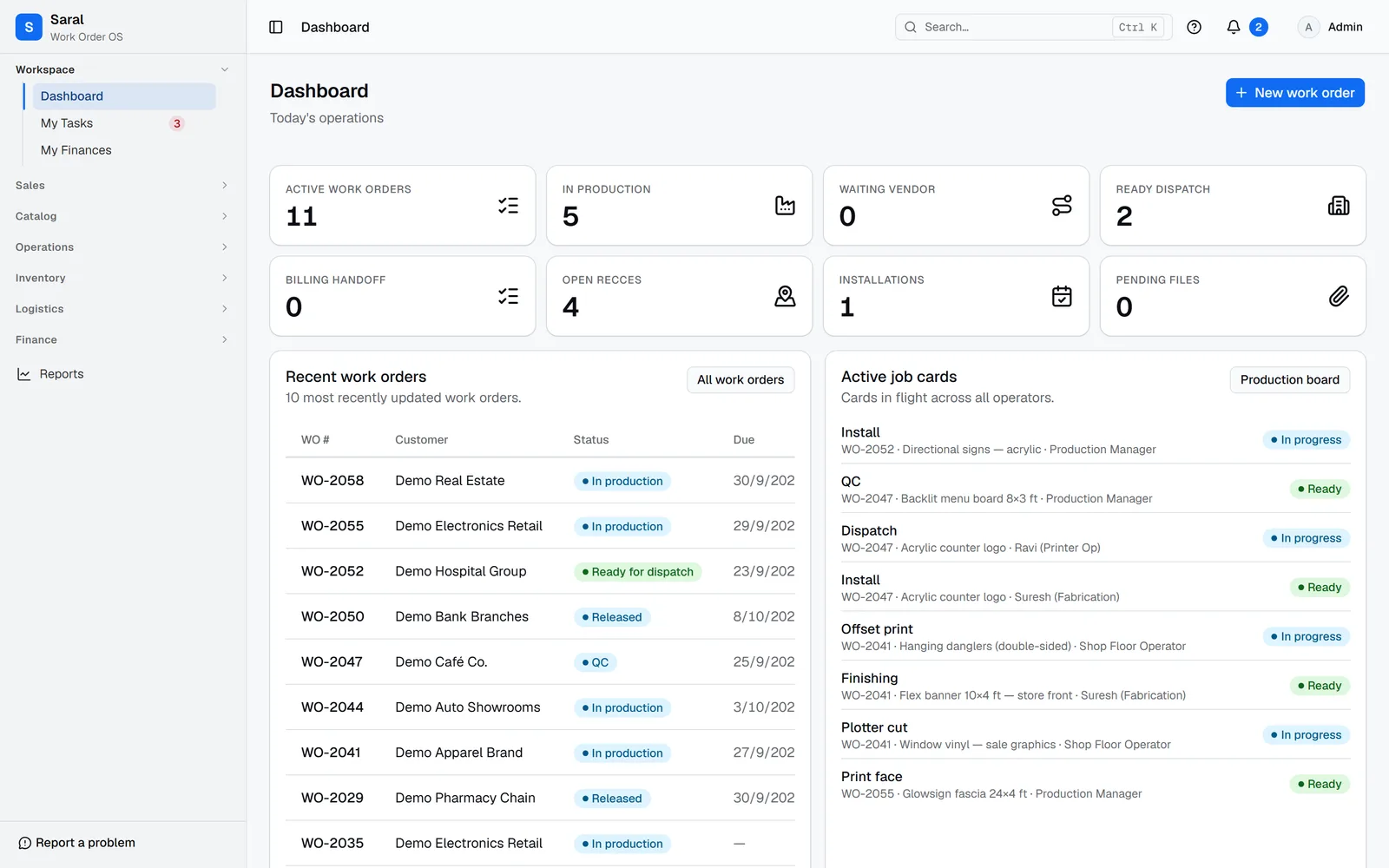
Shown with demo data · tap for the full screen
Sound familiar?
Your week today, and with Saral.
If two of these sound like your week, a demo is worth your time.
Request a Saral demo →- 01
Jobs move between a factory, branches, install sites, and vendor partners with no shared status.
With Saral
Every work order, job card, recce, and install, across every location and vendor, on one screen.
- 02
Nobody can answer “where is my order?” without calling the factory, because status lives in a WhatsApp group.
With Saral
Each job shows its stage, from production and QC to dispatch and billing, so anyone can answer without a call.
- 03
Quoting, production tracking, and installation scheduling each live in a different tool.
With Saral
The approved quote becomes the work order, the job cards, the install schedule, and the GST invoice.
- 04
Generic job software doesn’t know what an element, a recce, or an install is.
With Saral
Each element gets its own job cards, and every install ends with proof photos and a certificate.
How it runs
One flow, start to finish.
Quote approved
Work order into job cards
Production, QC & vendors
Dispatch & install
GST invoice & payment
Quote approved
Work order into job cards
Production, QC & vendors
Dispatch & install
GST invoice & payment
A look inside
Saral, screen by screen.
Each screen answers a question you ask today by phone or on WhatsApp.
01Production plan
What should each machine run next?
A queue per workstation. Drag to reorder or reassign, bump urgent jobs, and batch similar work on the same machine.
saral · production plan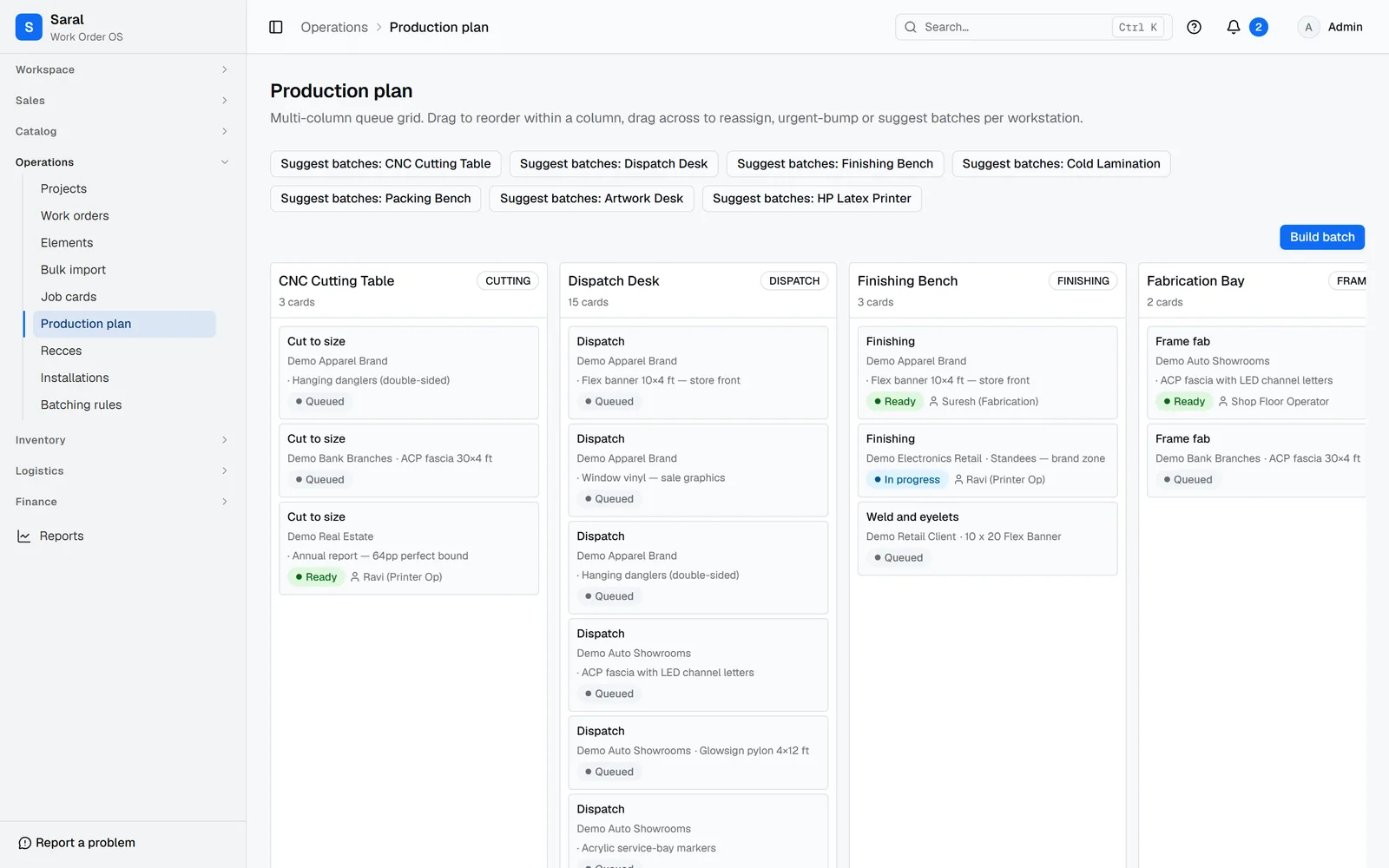
Demo data · tap for the full screen
02Job cards
Who is working on what, and on which machine?
Each element breaks into job cards with a machine and an owner, so the shop floor always knows what’s next.
saral · job cards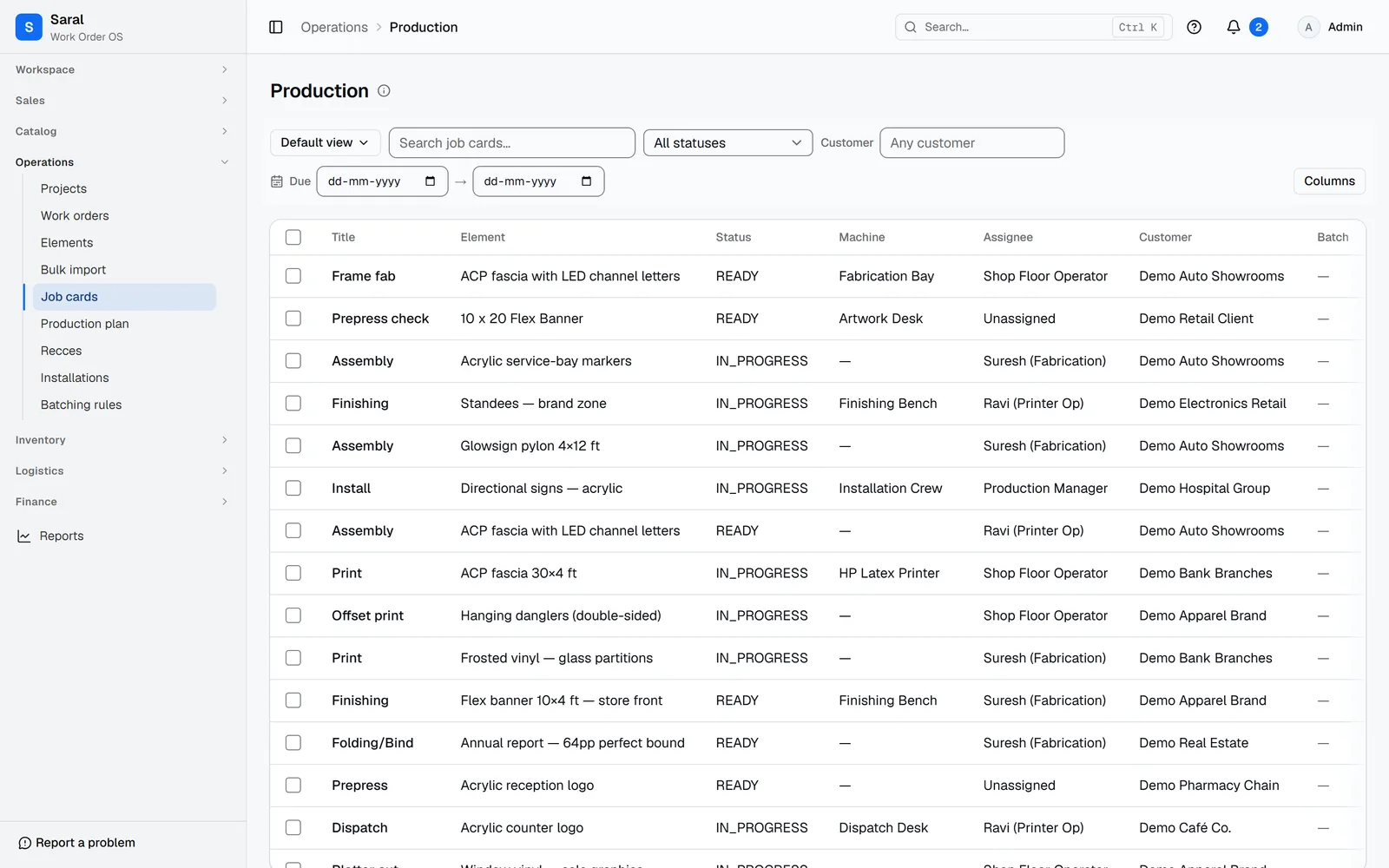
Demo data · tap for the full screen
03GST invoicing
Which invoices are still unpaid?
GST invoices with place of supply, straight from the work order, with overdue payments flagged automatically.
saral · gst invoicing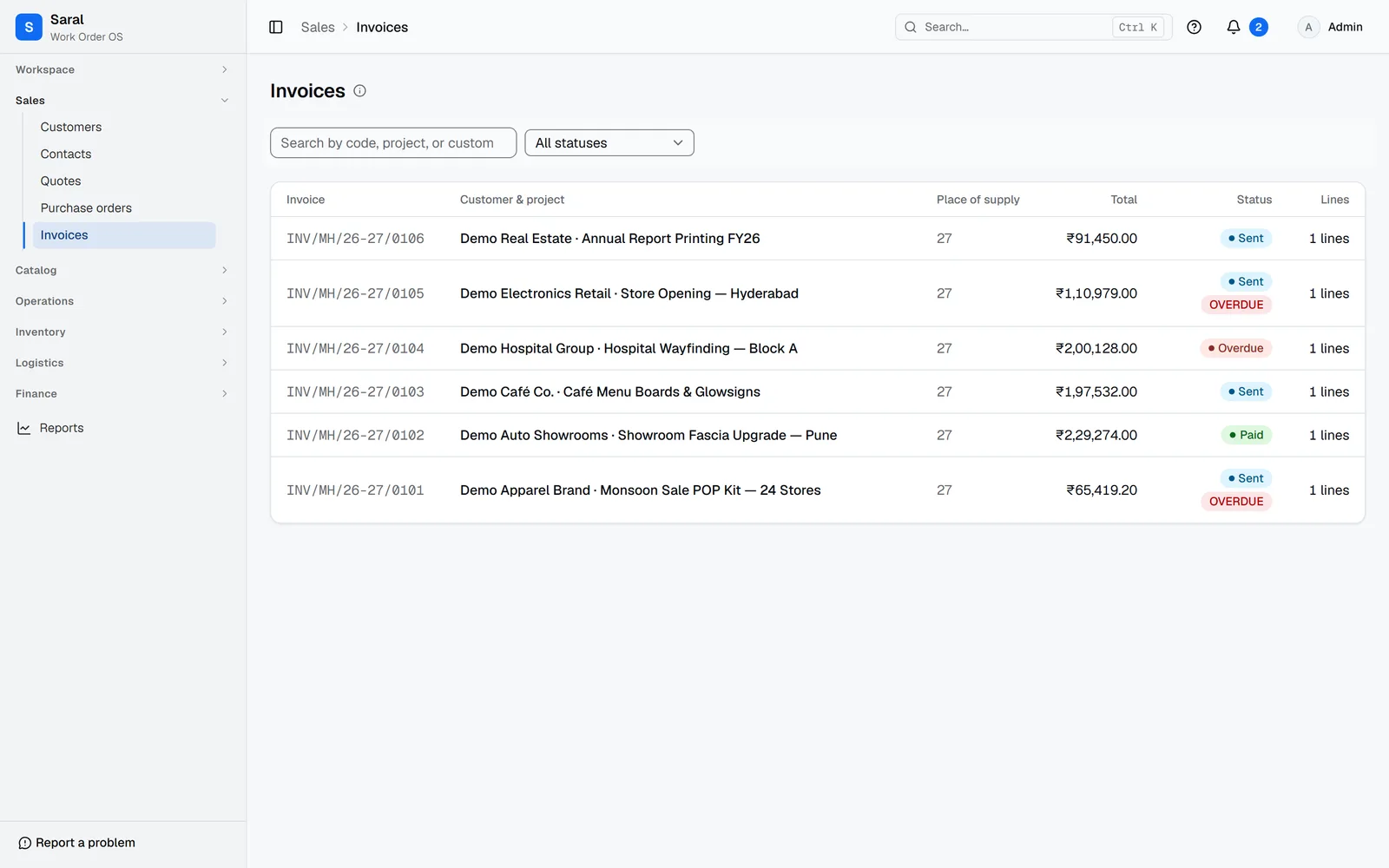
Demo data · tap for the full screen
04Receivables
Who owes us, and how late are they?
What you are owed, what is overdue, and by whom. One of 14 reports, alongside project P&L and vendor SLA.
saral · receivables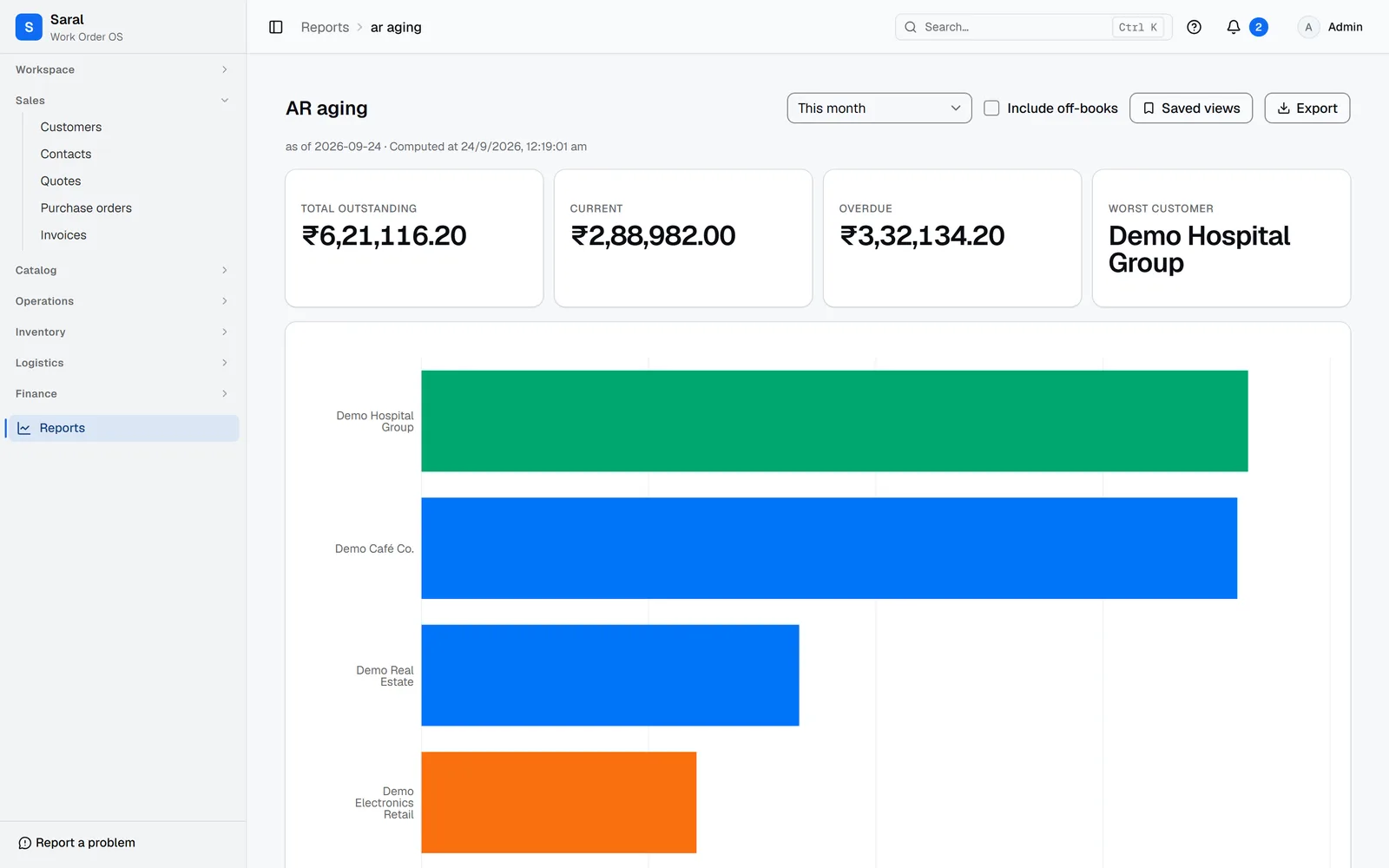
Demo data · tap for the full screen
05Roles & permissions
Who can see our cost and margin?
A role-by-action matrix enforced on the server, with access scoped by location, department, or region.
saral · roles & permissions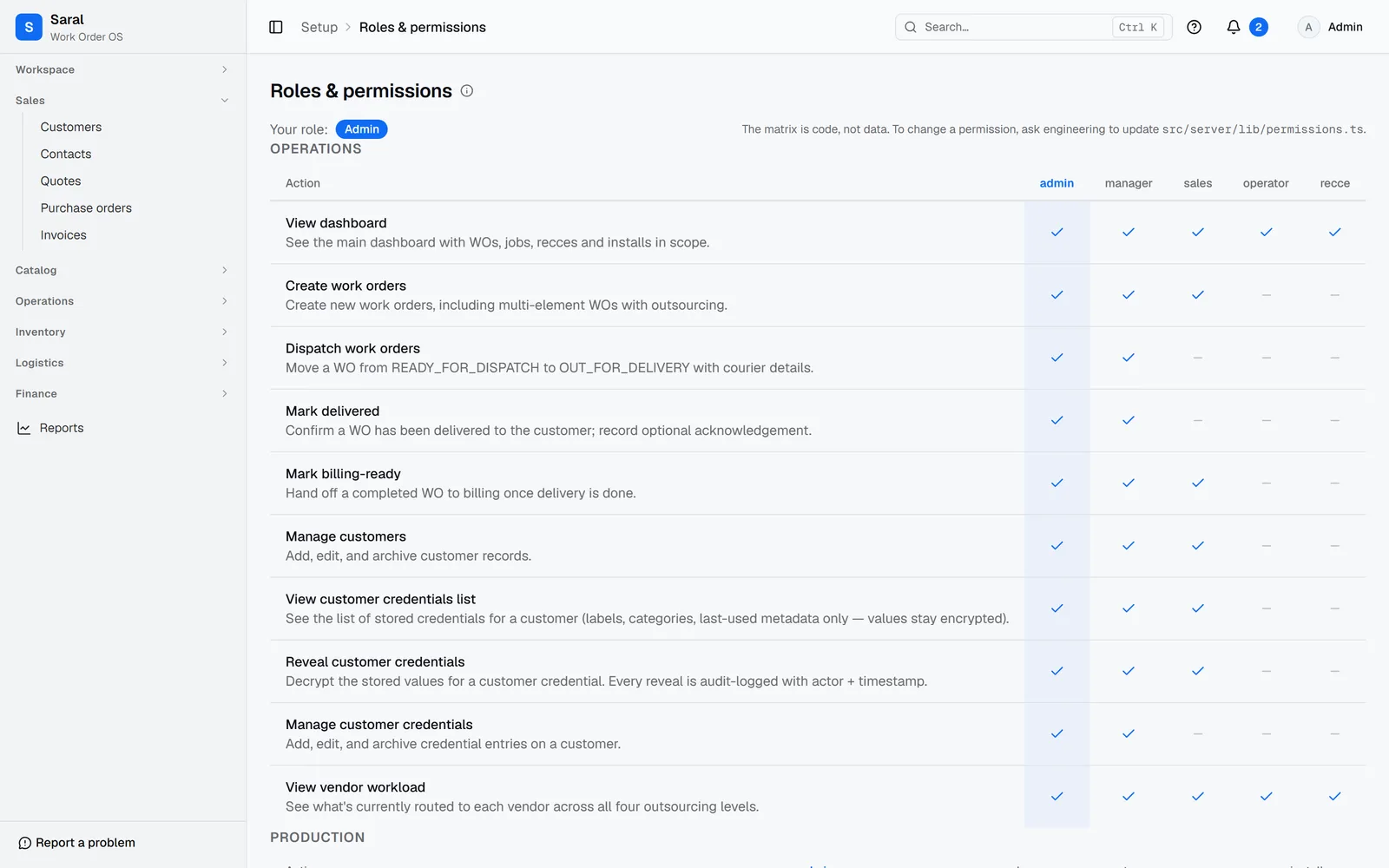
Demo data · tap for the full screen
The details
The small rules that make the numbers trustworthy.
01
Wastage that compounds correctly
Each material has an allowed wastage, and workstation waste factors multiply: a 3% bleed and a 2% misprint make 1.03 × 1.02. The wastage report counts only what goes beyond the allowance.
02
Outsourcing that cascades
Set a vendor on the project and it flows down to every work order, element, and card, unless a lower level overrides it. A card marked in-house or skipped always wins.
03
Rework has a cause
A failed QC check opens a linked rework card with its root cause. When the fault is the worker’s, the incentive for that card is reversed automatically.
04
Approvals that route themselves
An approver can be a person, a role at a location, or the requester’s manager one or two levels up. Rules route by conditions such as amount, and overdue approvals escalate on their own.
05
Margins stay private
Sales staff never see cost or margin. It’s removed on the server, not just hidden on the screen.
06
Invoice numbers never collide
Numbering runs per state and financial year, and is locked so two people issuing invoices at once can never get the same number.
See these rules at work in a demo.
Features
Everything it does, module by module.
Grouped the way your team splits the work, so each person can find their part.
Quotes & pricing · 4
- Quote revisions with customer approval on record, converted straight to an order
- Catalogue rates, customer rate cards, and slabs, with cost-plus pricing when no rate exists
- Every price override is audited, and expired quotes are flagged automatically
- Walk-in quick sale: order, job cards, and a paid invoice in one step
Projects & work orders · 4
- Project, then sites, then elements, for multi-site rollouts
- Import site and element lists from a spreadsheet, with a dry-run preview first
- Work order stages from draft through production, QC, dispatch, and delivery to billed
- Artwork approval gate: production can’t start until the artwork is approved
Production · 5
- Each element spawns its own job cards; each step in-house, outsourced, or skipped
- Cards unblock automatically the moment the steps before them finish
- Production plan per workstation: drag to reorder or reassign, bump urgent jobs
- Batching suggestions by material and machine capacity
- Crews, or several people, on one job card
Quality · 4
- QC checklists with measurements, notes, and required photos
- A failed check creates a linked rework card and counts the rework
- Every rework records its root cause: worker, upstream step, customer change, or material
- Pre-dispatch QC report generated as a document
Recce & installation · 4
- Recce scheduling, site contacts, measurements, access and risk notes, and photos
- Recce reports exported as PowerPoint or Excel
- Installs scheduled per site in bulk; blocked sites recorded with photo and location
- Proof photos, optional customer signature, consumables used, and an installation certificate
Vendors & outsourcing · 4
- Outsource at project, work order, element, or single-card level
- Elements sent out to a vendor with an expected return date
- Vendor bills and part-payments, with charges tied to the job card
- Vendor SLA report: lead times and what’s overdue right now
Inventory & purchasing · 5
- Receipts, supplier purchase orders, transfers, reorder levels, and stock allocation
- Bill of materials worked out from the quote
- Purchase plan: what the jobs need, minus free stock and stock on order, grouped by supplier
- Work in progress and finished goods valued at weighted-average cost
- Low-stock and wastage-variance alerts
Billing & money · 4
- GST invoices from several companies, each with its own GSTIN and bank
- Credit notes, write-offs, and partial payments with TDS details
- Expenses, cash advances, and billable expenses passed through to the invoice
- Worker incentives per sq ft, per piece, or per card, exported for payroll
01
Quotes & pricing
- Quote revisions with customer approval on record, converted straight to an order
- Catalogue rates, customer rate cards, and slabs, with cost-plus pricing when no rate exists
- Every price override is audited, and expired quotes are flagged automatically
- Walk-in quick sale: order, job cards, and a paid invoice in one step
02
Projects & work orders
- Project, then sites, then elements, for multi-site rollouts
- Import site and element lists from a spreadsheet, with a dry-run preview first
- Work order stages from draft through production, QC, dispatch, and delivery to billed
- Artwork approval gate: production can’t start until the artwork is approved
03
Production
- Each element spawns its own job cards; each step in-house, outsourced, or skipped
- Cards unblock automatically the moment the steps before them finish
- Production plan per workstation: drag to reorder or reassign, bump urgent jobs
- Batching suggestions by material and machine capacity
- Crews, or several people, on one job card
04
Quality
- QC checklists with measurements, notes, and required photos
- A failed check creates a linked rework card and counts the rework
- Every rework records its root cause: worker, upstream step, customer change, or material
- Pre-dispatch QC report generated as a document
05
Recce & installation
- Recce scheduling, site contacts, measurements, access and risk notes, and photos
- Recce reports exported as PowerPoint or Excel
- Installs scheduled per site in bulk; blocked sites recorded with photo and location
- Proof photos, optional customer signature, consumables used, and an installation certificate
06
Vendors & outsourcing
- Outsource at project, work order, element, or single-card level
- Elements sent out to a vendor with an expected return date
- Vendor bills and part-payments, with charges tied to the job card
- Vendor SLA report: lead times and what’s overdue right now
07
Inventory & purchasing
- Receipts, supplier purchase orders, transfers, reorder levels, and stock allocation
- Bill of materials worked out from the quote
- Purchase plan: what the jobs need, minus free stock and stock on order, grouped by supplier
- Work in progress and finished goods valued at weighted-average cost
- Low-stock and wastage-variance alerts
08
Billing & money
- GST invoices from several companies, each with its own GSTIN and bank
- Credit notes, write-offs, and partial payments with TDS details
- Expenses, cash advances, and billable expenses passed through to the invoice
- Worker incentives per sq ft, per piece, or per card, exported for payroll
Specification
What’s built in, today.
Every line on this sheet is running in the product now. Nothing here is a roadmap item.
Who logs in
- Admin
- Everything, including users, branding, imports, financial reports, and bypassing approvals.
- Manager
- Quotes, invoices, inventory, approvals, expenses, production planning, dispatch, and reports, with cost and margin.
- Sales
- Customers, quotes, work orders, and reports. No cost or margin visibility.
- Operator
- Job cards, transfers, production planning, recce, and installs, at their own locations.
- Recce
- Recce screens and the field app.
- Installer
- Installation screens, the field app, and vehicles.
Built in
- Six roles plus per-user permissions, scoped by company (GSTIN), location, department, or region. Cost and margin are removed on the server for sales staff.
- Audit log with before-and-after on every change, with personal data redacted.
- Installable app with web and Android push. Shop-floor status updates queue offline and sync when the signal returns.
- 14 reports, including project P&L, customer profitability, AR/AP ageing, vendor SLA, capacity, and wastage, exported to Excel or PDF.
- CGST and SGST or IGST by place of supply, invoice series per state and financial year, credit notes, TDS on receipts, and e-way bill details.
- Your own instance and database, set up for your locations, departments, and GST registrations. Nothing is shared with another customer.
Questions
Before you ask for a demo.
We run several factories and branches. Does it fit?
That’s what it was built for. Job cards go to the right workstation at the order’s own location, planners reassign across workstations by dragging, and each person’s access can be scoped to their location, department, or region.
Can we bring in our existing data?
Yes. Customers, vendors, locations, product types, and site and element lists import from spreadsheets, each with a dry-run preview before anything is saved. Onboarding starts from a template for your kind of shop.
Does it work where the signal drops?
Job-card status updates, tour stops, and expenses queue on the device and sync in order when the connection returns. Anything that fails repeatedly lands in a review list rather than disappearing.
How does it fit with our accountant?
Saral issues the GST invoices and credit notes and records payments with TDS. Invoices, payments, and expenses export to Excel for your accountant to bring into Tally or any other package.
Where does our data live?
In your own instance and your own database. Nothing is shared with another customer, and your data stays yours.
Can it be changed to fit how we work?
Yes. We build and run these products ourselves, so changes for your workflow can be scoped and priced like any other build.
See how we approach custom builds.How is it priced?
We quote in writing after a short demo, once we know your users, locations, and how you work today. The demo costs nothing, and there’s no obligation.
Not quite your business?
- A vehicle-hire, staff-transport, or goods fleetSarathi
- A construction or real-estate builder firmSadan
Build
Or get software built around how you work.
We build custom software and workflows the same way we built Saral. Orders, approvals, dispatch, billing, and reports move off WhatsApp and Excel into one system your team uses, scoped and priced in writing, and yours to keep.
Next step
What happens after you ask.
No obligation at any step. Ask with the form, by email, or on WhatsApp, and we reply within 24 hours.
Request a Saral demo →- 01
A free demo
With the person who builds Saral, on demo data, focused on the parts your business would use.
- 02
A quote in writing
Priced once we know your users, your locations, and how you work today.
- 03
Your own instance
Set up for your business on its own database. Nothing is shared with another customer, and your data stays yours.
- 04
Changes, if you need them
Anything specific to how you work is scoped and priced in writing, like any custom build.