Sarathi: fleet and vehicle-hire software
Know which vehicle is free, what each driver is owed, and which trips make money.
Cars, buses, and goods vehicles, across local, outstation, and staff-transport trips and goods runs. In daily use at a working vehicle-hire business.
Free, no obligation. Replies within 24 hours.
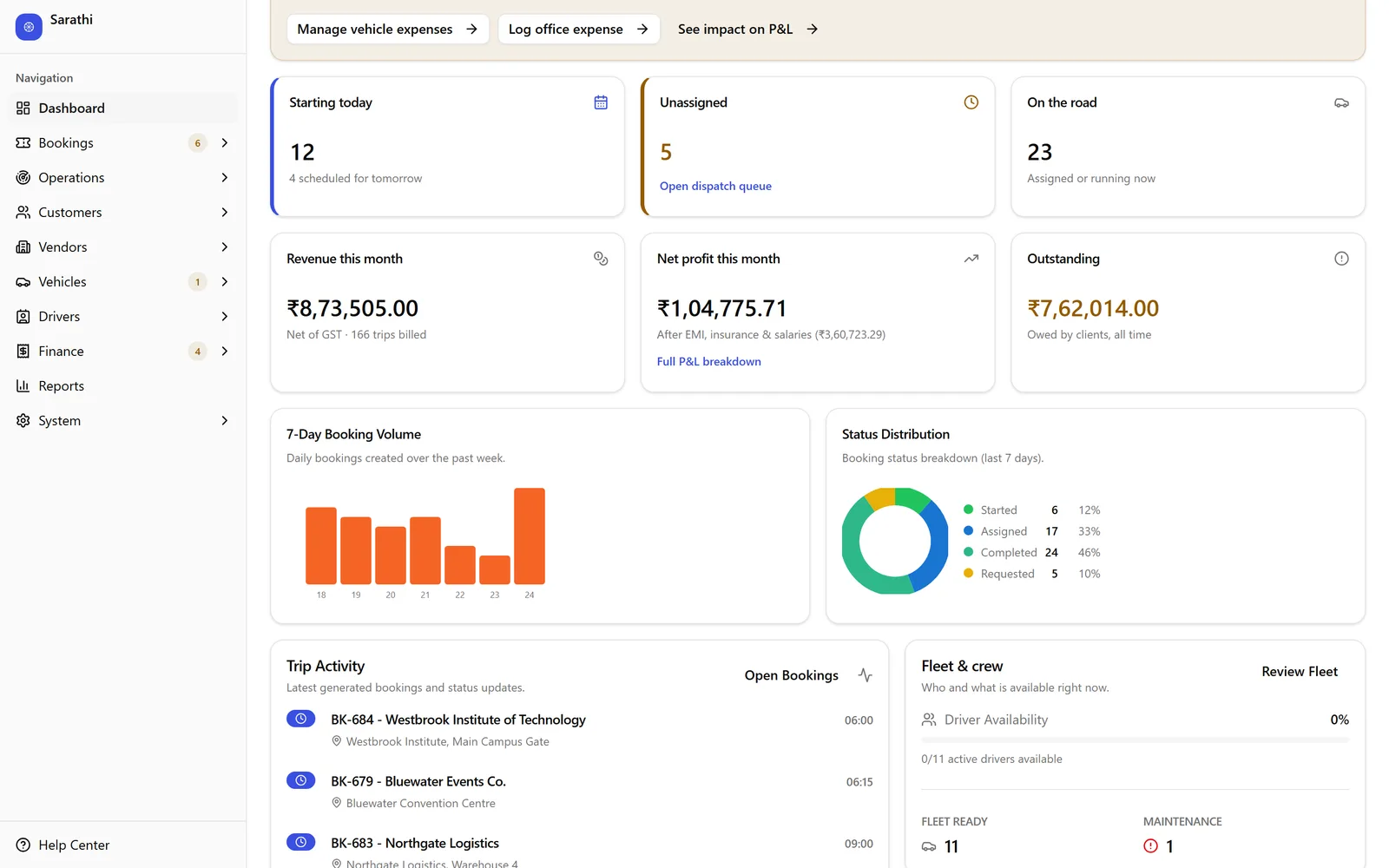
Shown with demo data · tap for the full screen
Sound familiar?
Your week today, and with Sarathi.
If two of these sound like your week, a demo is worth your time.
Request a Sarathi demo →- 01
Bookings arrive by phone and WhatsApp, and a double-booking surfaces only when two cars are promised the same slot.
With Sarathi
Every booking sits on one fleet timeline, and a double-booking is blocked unless someone overrides it with a written reason.
- 02
Driver bata, advances, and fuel cash are settled from memory, and nobody is sure who owes whom.
With Sarathi
Each driver has a ledger of bata, advances, and payouts, and settlement repays only what they spent in cash or UPI.
- 03
Insurance, permits, fitness, and PUC expire without anyone noticing until a vehicle is stopped.
With Sarathi
Insurance, permit, fitness, PUC, road tax, and RC carry expiry reminders.
- 04
You know this month’s total, but not which vehicle, client, or trip is losing money.
With Sarathi
Profit by vehicle, client, and trip, with the vehicles losing money flagged.
How it runs
One flow, start to finish.
Booking priced from the rate card
Vehicle and driver assigned
Trip run on the driver app
Settled and billed
P&L by vehicle and client
Booking priced from the rate card
Vehicle and driver assigned
Trip run on the driver app
Settled and billed
P&L by vehicle and client
A look inside
Sarathi, screen by screen.
Each screen answers a question you ask today by phone or on WhatsApp.
01Fleet timeline
Which vehicle is free, and when?
Every vehicle, hour by hour. Contract windows, committed trips, and the free gaps you can still sell.
sarathi · fleet timeline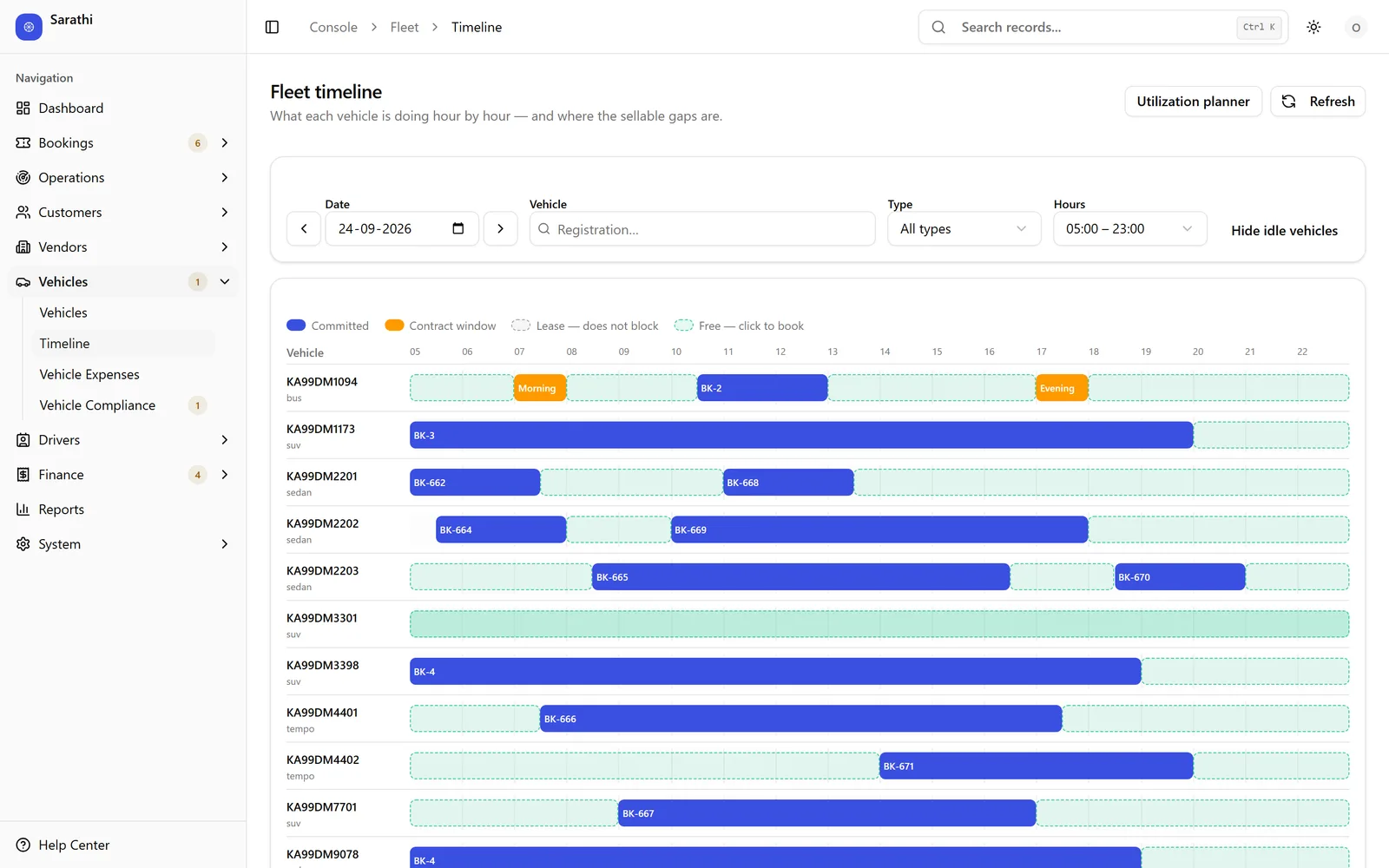
Demo data · tap for the full screen
02Live map
Where are our running trips right now?
Every running trip at its latest GPS fix, from the driver app’s background tracking.
sarathi · live map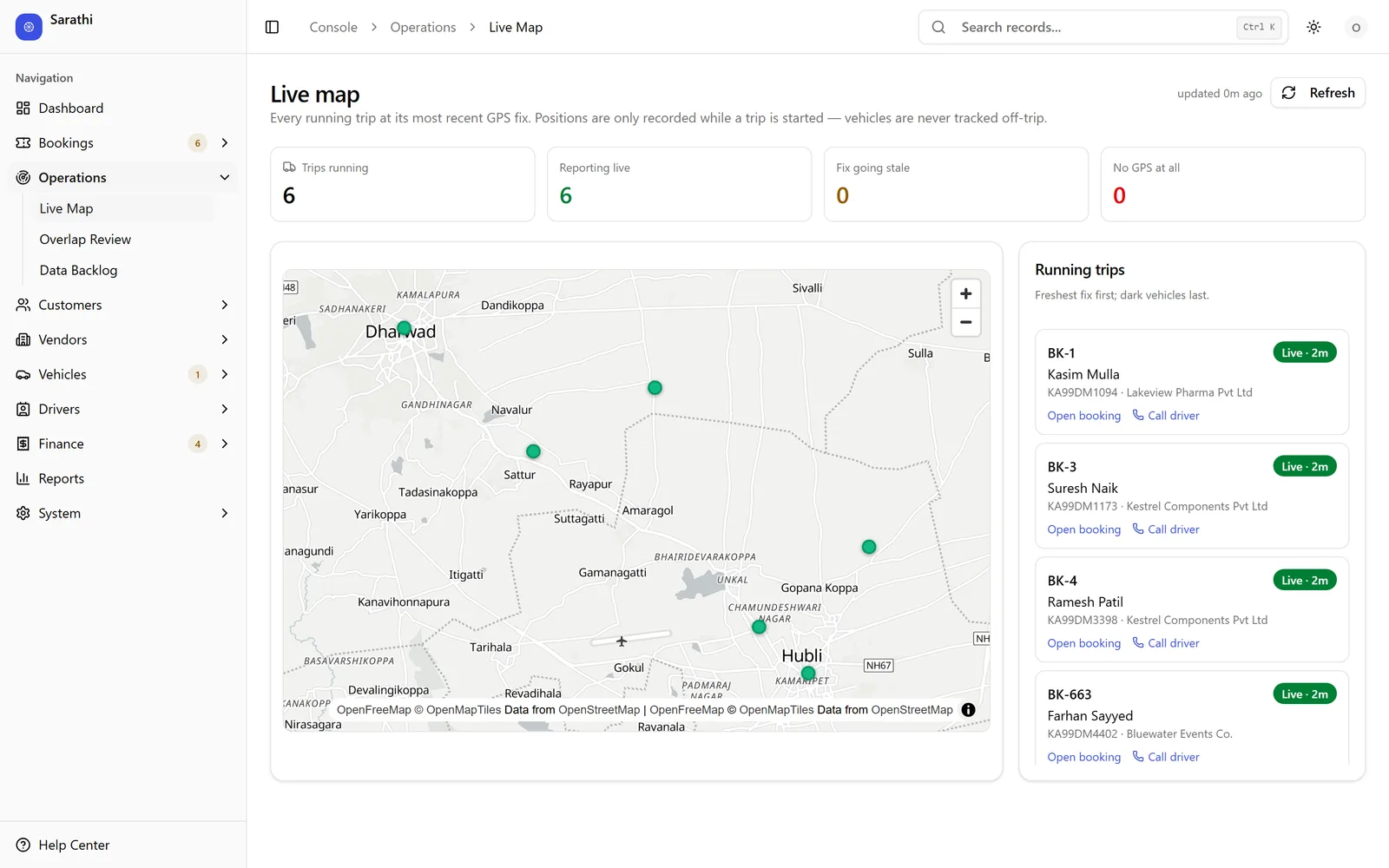
Demo data · tap for the full screen
03Owner P&L
Is the business actually making money?
Revenue, costs, and net profit for the whole business, with EMI, insurance, and salaries accounted for.
sarathi · owner p&l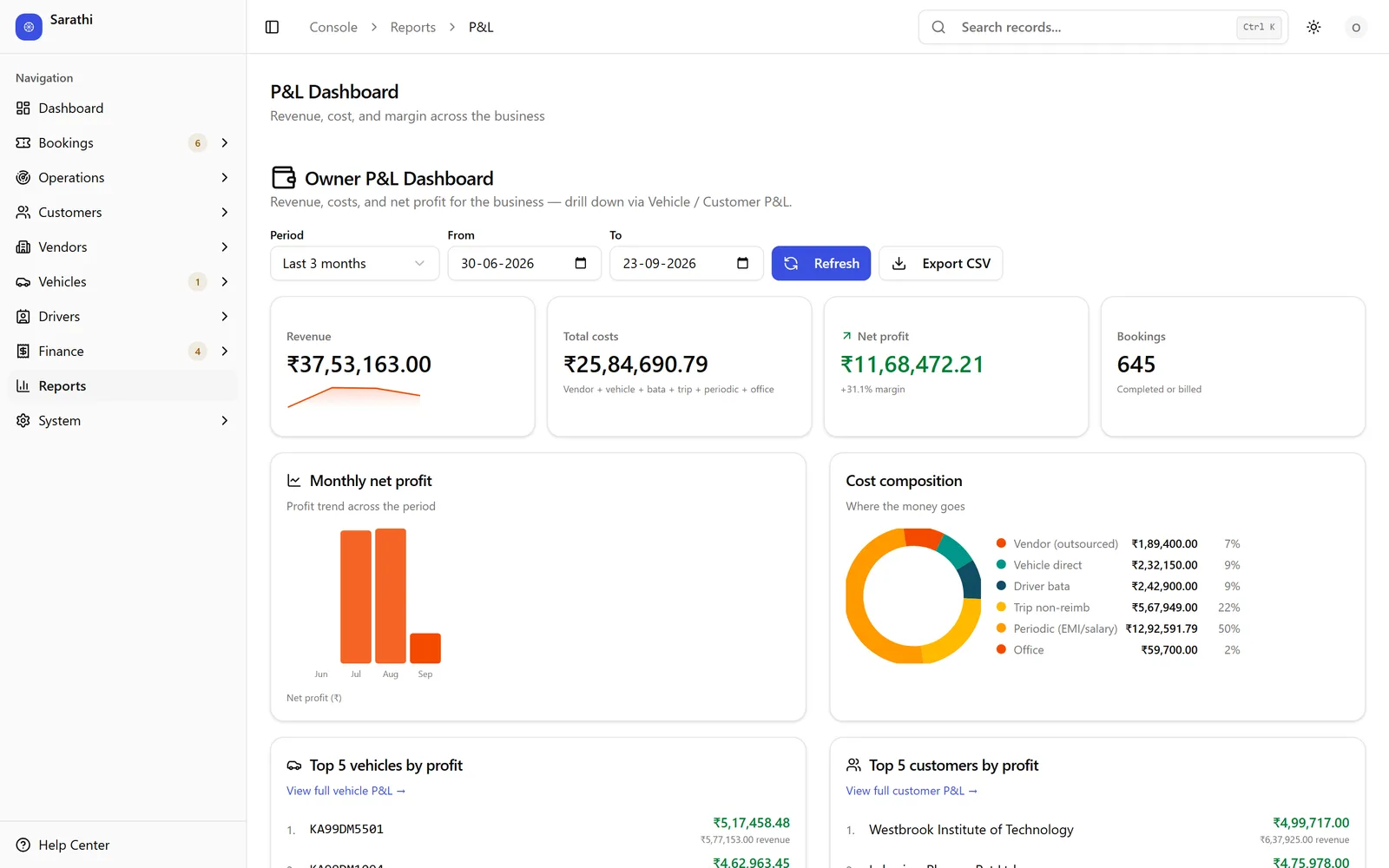
Demo data · tap for the full screen
04Vehicle P&L
Which vehicle is losing money?
Profit per vehicle, with fuel, service, EMI, and salary allocated, and the loss-makers flagged automatically.
sarathi · vehicle p&l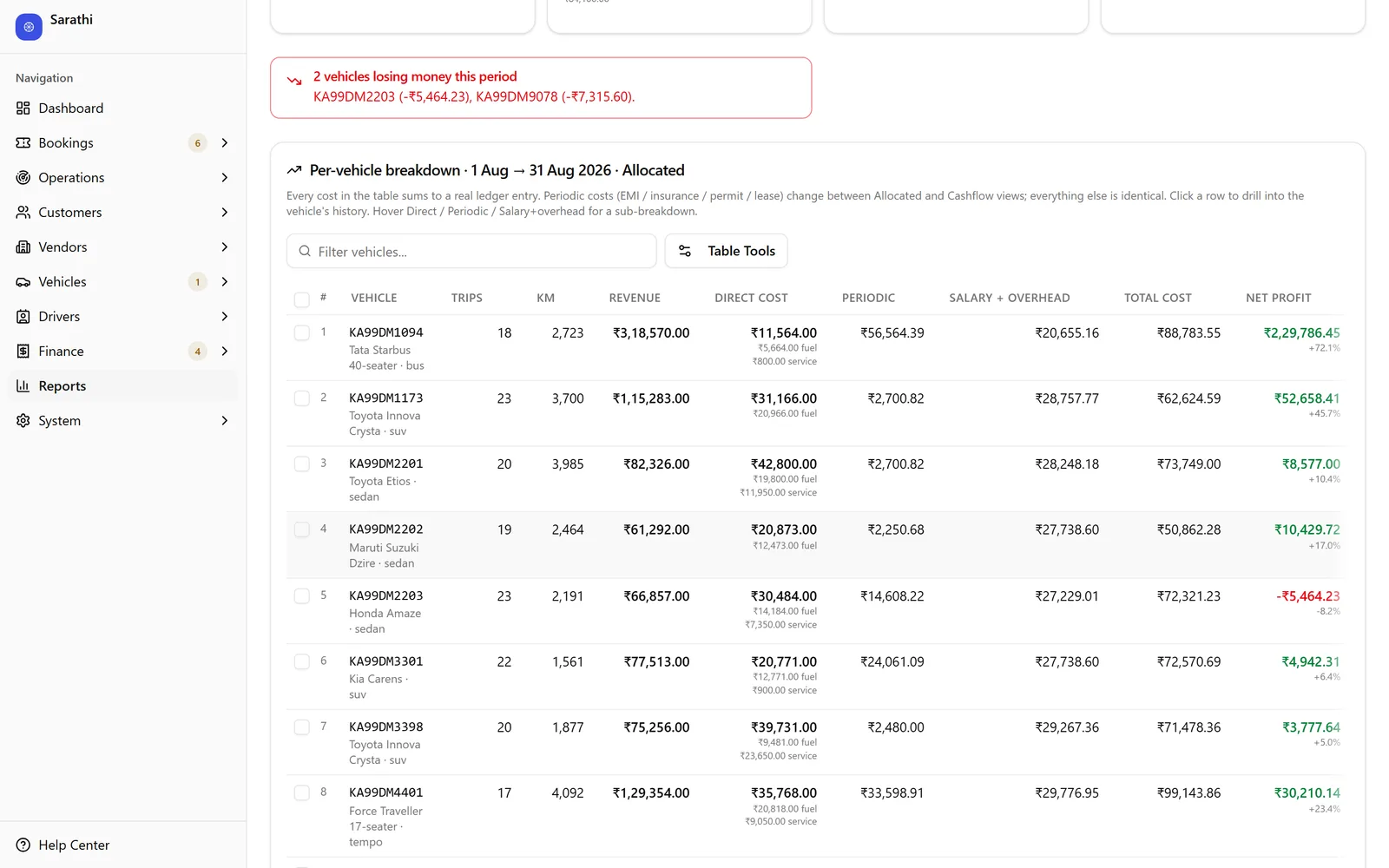
Demo data · tap for the full screen
05Driver ledger
What do we owe each driver?
What each driver has earned, been advanced, and is owed. Ledgers are append-only and never overwritten.
sarathi · driver ledger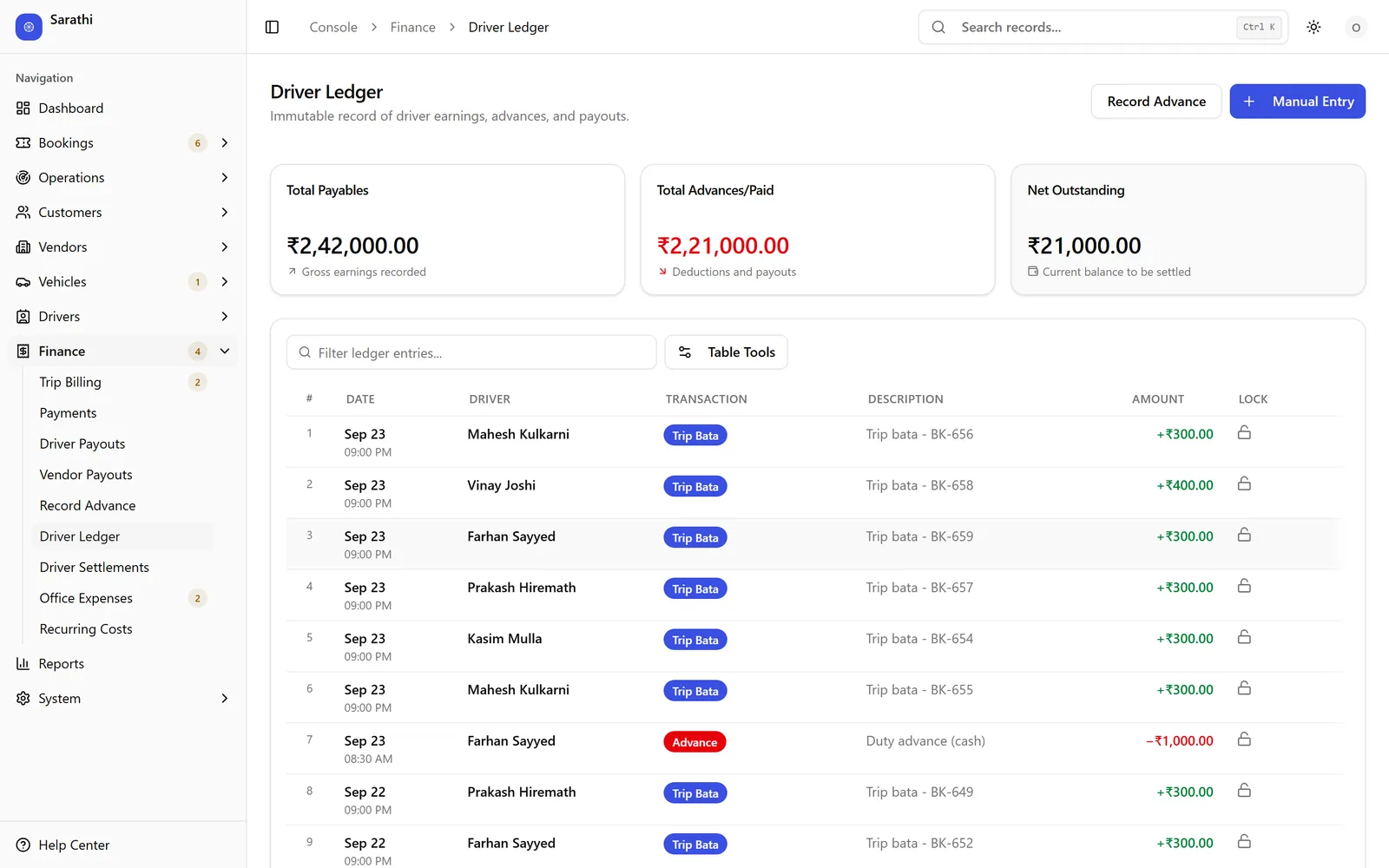
Demo data · tap for the full screen
The details
The small rules that make the numbers trustworthy.
01
Bata is counted once
Driver bata becomes a cost when the trip completes, not when it’s settled. Every report uses the same definition, and it’s never billed to the client twice.
02
Blank is not zero
A missing bata or vendor cost blocks billing, but never stops a driver ending the trip. Zero is an answer; an empty field isn’t.
03
No double reimbursement
Settlement is recalculated on the server and repays only what the driver spent in cash or UPI. Fuel paid on the petro card is never paid out again.
04
Two honest views of profit
See vehicle P&L with costs spread evenly, or as they were actually paid. Salary is split by km driven, and idle vehicles show the revenue they lost against their class.
05
Cost per km from your own data
Each trip is costed from that vehicle’s last 30 days, falling back to its class and then the fleet, so trip margins reflect how your vehicles really run.
06
Guard rails on cash
A single payout above ₹2 lakh is blocked by the server, not just hidden on screen, so a slipped zero can’t go out as a payout.
See these rules at work in a demo.
Features
Everything it does, module by module.
Grouped the way your team splits the work, so each person can find their part.
Bookings & enquiries · 4
- Four-step booking wizard with similar-booking and credit-limit warnings
- Local packages (4h/40km, 8h/80km, 12h/120km), outstation per day, transfers, and monthly leases
- Enquiries tracked from quoted to converted or lost
- Passenger lists, trip sheets, toll receipts, and delivery challans kept on the booking
Dispatch & fleet · 5
- Hour-by-hour fleet timeline that shows the gaps you can still sell
- One booking can run several vehicles across classes
- Double-booking guard, overridable only with a written reason, plus an overlap review
- Partial occupancy: hold a vehicle only 7 to 8 am, Monday to Saturday
- Vehicle-by-day utilisation grid
Rate cards & vendors · 4
- Each client can have its own rates; anything their card doesn’t cover falls back to your standard rate card, cell by cell
- Separate buying cards for vendor costs, never used to price a customer
- Any trip can run on your own fleet or be handed to an outside vendor
- Vendor partners log in and see only the trips given to them
Driver app · 4
- Start and end trips, log expenses, kilometres, and a daily log
- Odometer photo at start and end on own-fleet trips, from the rear camera
- Passenger signature capture on the phone
- Push alert on every new assignment, and biometric login
Drivers & payroll · 4
- Licence, badge, police verification, Aadhaar, ESI, and PF on file
- Monthly salary with effective dates, so past months never change
- Quick advances, per-trip settlement worklist, and payouts
- Recovery ledger for fines and incident deductions
Vehicles & compliance · 4
- Insurance, permit, fitness, PUC, road tax, and RC with expiry reminders
- One entry records the renewal cost and the new document together
- Service, oil, repair, tyre, battery, and accident logs, with km between services
- Fuel refills logged from the driver app, efficiency measured tank to tank
Billing & receivables · 4
- Bill per booking with GST inclusive, exclusive, or exempt
- Tolls and parking passed through to the client or included in the fare
- Trip sheet required on file before a trip can be billed
- One payment split across many bookings; credit limits and periods per client
Costs & reports · 4
- Vehicle costs: EMI, insurance, lease, permit, FASTag, and maintenance contracts
- Recurring office costs with dated revisions
- 13 reports plus statements per client, driver, vehicle, vendor, and fuel card
- Booking updates by email, SMS, or WhatsApp, with a delivery log
01
Bookings & enquiries
- Four-step booking wizard with similar-booking and credit-limit warnings
- Local packages (4h/40km, 8h/80km, 12h/120km), outstation per day, transfers, and monthly leases
- Enquiries tracked from quoted to converted or lost
- Passenger lists, trip sheets, toll receipts, and delivery challans kept on the booking
02
Dispatch & fleet
- Hour-by-hour fleet timeline that shows the gaps you can still sell
- One booking can run several vehicles across classes
- Double-booking guard, overridable only with a written reason, plus an overlap review
- Partial occupancy: hold a vehicle only 7 to 8 am, Monday to Saturday
- Vehicle-by-day utilisation grid
03
Rate cards & vendors
- Each client can have its own rates; anything their card doesn’t cover falls back to your standard rate card, cell by cell
- Separate buying cards for vendor costs, never used to price a customer
- Any trip can run on your own fleet or be handed to an outside vendor
- Vendor partners log in and see only the trips given to them
04
Driver app
- Start and end trips, log expenses, kilometres, and a daily log
- Odometer photo at start and end on own-fleet trips, from the rear camera
- Passenger signature capture on the phone
- Push alert on every new assignment, and biometric login
05
Drivers & payroll
- Licence, badge, police verification, Aadhaar, ESI, and PF on file
- Monthly salary with effective dates, so past months never change
- Quick advances, per-trip settlement worklist, and payouts
- Recovery ledger for fines and incident deductions
06
Vehicles & compliance
- Insurance, permit, fitness, PUC, road tax, and RC with expiry reminders
- One entry records the renewal cost and the new document together
- Service, oil, repair, tyre, battery, and accident logs, with km between services
- Fuel refills logged from the driver app, efficiency measured tank to tank
07
Billing & receivables
- Bill per booking with GST inclusive, exclusive, or exempt
- Tolls and parking passed through to the client or included in the fare
- Trip sheet required on file before a trip can be billed
- One payment split across many bookings; credit limits and periods per client
08
Costs & reports
- Vehicle costs: EMI, insurance, lease, permit, FASTag, and maintenance contracts
- Recurring office costs with dated revisions
- 13 reports plus statements per client, driver, vehicle, vendor, and fuel card
- Booking updates by email, SMS, or WhatsApp, with a delivery log
Specification
What’s built in, today.
Every line on this sheet is running in the product now. Nothing here is a roadmap item.
Who logs in
- Owner
- Everything, including full backup and restore, and the admin accounts.
- Admin
- Runs the system day to day: users, roles, settings, and every module.
- Operations manager
- Bookings, fleet, drivers, clients, and finance.
- Dispatcher
- Takes bookings and assigns vehicles and drivers; can view the fleet and drivers.
- Accountant
- Finance and payments; can view bookings and clients.
- Driver
- Their own workboard only: trips, expenses, fuel, and daily log. Salary rows stay hidden.
- Vendor partner
- Only the trips outsourced to their company.
Built in
- Seven roles, from owner to vendor partner, enforced by database row-level security. When an admin views the app as a driver, it’s logged.
- Audit trail across bookings, fleet, and finance. Bookings are corrected or voided with a written reason.
- Android driver app: trip-only background GPS after consent, odometer photos, signatures, and push alerts.
- 13 reports, including vehicle, customer, and client P&L, revenue leakage, receivables ageing, fuel efficiency, and utilisation, with CSV export.
- GST inclusive, exclusive, or exempt per rate card or booking. Expiry tracking for insurance, permit, fitness, PUC, road tax, and RC.
- Your own instance and database, branded to your business, with full backup and restore.
Questions
Before you ask for a demo.
Does it handle trips we hand to other operators?
Yes. Any trip can be run by an outside vendor instead of your own fleet. Vendor costs come from separate buying rate cards, vendors can log in to see only their trips, and a vendor performance report shows how each one does.
Does it produce the GST tax invoice?
Sarathi prices every booking with GST inclusive, exclusive, or exempt and marks it billed with your invoice number and date. The tax invoice itself stays in your accounting software, such as Tally, so your books remain in one place.
What do drivers need?
An Android phone. GPS is recorded only while a trip is running, and only after the driver agrees. Drivers see their own trips and nothing else.
Is it only for passenger vehicles?
No. Goods transport runs alongside passenger trips, with pricing by base fare plus per km or a fixed fare per destination for each vehicle class, for both selling and buying.
Where does our data live?
In your own instance and your own database. Nothing is shared with another customer, and your data stays yours.
Can it be changed to fit how we work?
Yes. We build and run these products ourselves, so changes for your workflow can be scoped and priced like any other build.
See how we approach custom builds.How is it priced?
We quote in writing after a short demo, once we know your users, locations, and how you work today. The demo costs nothing, and there’s no obligation.
Not quite your business?
Build
Or get software built around how you work.
We build custom software and workflows the same way we built Sarathi. Orders, approvals, dispatch, billing, and reports move off WhatsApp and Excel into one system your team uses, scoped and priced in writing, and yours to keep.
Next step
What happens after you ask.
No obligation at any step. Ask with the form, by email, or on WhatsApp, and we reply within 24 hours.
Request a Sarathi demo →- 01
A free demo
With the person who builds Sarathi, on demo data, focused on the parts your business would use.
- 02
A quote in writing
Priced once we know your users, your locations, and how you work today.
- 03
Your own instance
Set up for your business on its own database. Nothing is shared with another customer, and your data stays yours.
- 04
Changes, if you need them
Anything specific to how you work is scoped and priced in writing, like any custom build.